Alright, let’s cut to the chase—if you’re running a surface grinding machine, you know the electrical system is the unsung hero that keeps your parts coming out dead-on. Skip the jargon and let’s get real about maintaining it, especially since I’ve been selling these machines for years (no corporate fluff here, just hard-earned tips from folks who use our grinders every day). Surface Grinding Machine

First off, let’s start with the basics you probably skip because you’re swamped: visual checks. Yeah, I know, your machine’s humming along fine, so why stare at wires? But here’s the thing—small issues turn into big headaches fast. Last quarter, a customer of ours ignored a frayed power cord that was just chaffing against the machine’s base, and it fried the main contactor. Cost him three days of downtime and a $800 part. So every morning, before you hit the power button, do a 2-minute walkaround: glance at the power cord for cracks or exposed copper, check the terminal boxes on the motor and control panel for loose wires (vibration will do that, trust me), and make sure the cooling fan on the motor isn’t clogged with metal shavings. Metal dust and electricity? A terrible combo—they short circuits like nobody’s business.
Next, let’s talk about regular cleaning, but not the kind where you blast the whole machine with a pressure washer (don’t even try it). The electrical components hate moisture, so keep that in mind. Use a soft, dry brush to wipe down the control panel buttons and the circuit board vents. If you’ve got a lot of fine aluminum or steel dust in your shop, grab a can of compressed air (the low-pressure kind—high pressure will bend pins!) and blow out the inside of the control box once a month. I once had a grinder where dust built up on the relay contacts and caused inconsistent spindle speed—parts were coming out with wavy surfaces, and we traced it straight to dust gunking up the electrical switches. Fix was a 5-minute blowout, saved the customer from redoing 20 parts.
Now, the control panel is the brain of the operation, so treat it like one. How often do you check the calibration of your voltage and current displays? Our machines come with basic monitoring, but that doesn’t mean you can ignore it. Every quarter, cross-check the display readings with a multimeter—if the voltage is off by more than 5%, that’s a sign something’s wrong with the line or the machine’s power regulation. Also, don’t slam the buttons on the control panel. I’ve seen guys pound the “start” button like it’s a vending machine (I’ve been guilty myself), but that breaks the internal switches over time. If a button sticks, don’t force it—take the cover off, gently clean around it, and it’ll be good as new. And for the love of all things metal, don’t leave the control panel exposed if you’re working in a really dusty or wet area. A quick plastic cover when the machine’s not in use goes a long way.
The motor and spindle electricals—these are the workhorses, so they need TLC. The spindle motor’s electrical connections: check the motor leads for tightness every 6 months. Vibration from the grinding table will loosen them, and a loose connection causes heat, which wears out motor windings fast. Also, check the motor’s thermal sensors. Most modern surface grinders have these to shut the motor down if it overheats, but if the sensor is dirty or misaligned, it’ll trigger a false shutdown when you’re in the middle of a long run. Last year, a customer was upset because his grinder kept stopping mid-job, and it turned out the thermal sensor was caked in grease—we cleaned it, and he was back up and running in 10 minutes.
Then there’s the grounding system—this is non-negotiable, not optional. If your grinder isn’t grounded properly, you’re looking at electrical shock risks, and also inaccurate part grinding because of static. Every 6 months, check the ground wire connection on the machine’s frame and the power outlet. Make sure it’s not corroded—corrosion creates a bad connection, which defeats the purpose of grounding. If you see rust on the ground lug, sand it down until it’s shiny before tightening it back up. I’ve heard horror stories of guys getting zapped when their grinder wasn’t grounded, and that’s a risk you don’t need.
Wait, let’s talk about load testing too. If you’re running heavy parts or working long shifts, do a monthly load test. Run the grinder at its maximum recommended load for 10 minutes, then check the electrical readings—current draw, voltage drop, temperature of the motor. If the current is spiking more than usual, that could mean a faulty bearing, or even a problem with the spindle motor’s electrical windings. Catching that early means you don’t have to replace a whole motor down the line. Our service team has seen way too many people delay this, and they end up with a $2,000 motor instead of a $150 bearing.
Also, small, easy wins: replace air filters for the control box’s cooling fan every 3 months. If the filter’s clogged, the control panel overheats, and that ruins circuit boards. I know, another “replace a small part” thing, but it’s cheap insurance. And keep a log—even a simple notebook or a notes app on your phone—of when you did checks, when you replaced parts, and any weird readings you saw. If something does go wrong, you’ll have a timeline to show what changed, which makes troubleshooting way faster. Our best customers are the ones who keep these logs—they rarely have major breakdowns because they catch issues early.
Now, let’s get real about when to call in backup. You don’t have to be an electrician, but if you see something like burning smells (that’s a big red flag—stop the machine immediately!), or the control panel is flickering nonstop, or you get error codes that you can’t find in the manual, don’t mess around. That’s where we come in. As a surface grinding machine supplier, we know every inch of our electrical systems, and our service team can walk you through fixes over the phone, or come to your shop if it’s something more serious. We’re not just here to sell you a machine—we’re here to make sure it runs for years without killing your production time.
Look, I get it—maintenance feels like another chore when you’re already swamped with orders. But here’s the math: 2 hours of maintenance a month vs. 3 days of downtime from a preventable electrical issue. That’s no contest. Every tip I shared here is stuff our own team trains customers on, and 90% of the electrical problems we get called for are from skipping these basic steps.
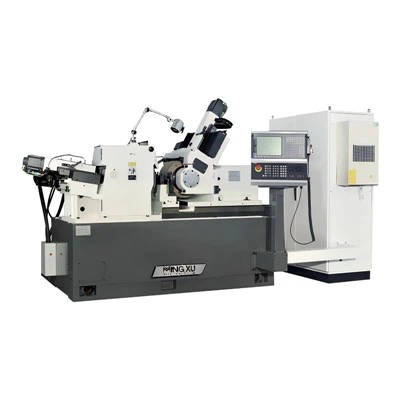
If you’re running a surface grinder right now, and it’s been a while since you checked the electrical system—go do that walkaround right after you finish this blog. You’ll thank me later. And if you’re in the market for a new surface grinder (or just need to upgrade yours for better reliability), hit us up. We don’t sell machines that are so complicated only engineers can fix them—we build them with maintenance in mind, and our team is here to support you every step of the way. Let’s chat, figure out what your shop needs, and make sure your grinder’s electrical system stays in tip-top shape for the long haul.
Wide-Wheel Centerless Grinder References
- Machinery’s Handbook, 31st Edition. Industrial Press Inc., 2020.
- OSHA Electrical Safety Guidelines for Industrial Machinery. U.S. Department of Labor, 2022.
- Surface Grinder Operation and Maintenance Manual Best Practices. Association for Manufacturing Technology, 2021.
- Electrical Maintenance for Industrial Machine Tools. International Electrotechnical Commission, 2019.
Wuxi Mingxu Machinery Equipment Co., Ltd.
As one of the most professional surface grinding machine manufacturers and suppliers in China, we’re featured by quality products and good price. Please rest assured to buy the best surface grinding machine for sale here from our factory. Also, custom service is available.
Address: No. 5-5 Jinke Wealth Plaza, Changjiang North Road, Xinwu District, Wuxi City, Jiangsu Province
E-mail: yingyingmxjd@163.com
WebSite: https://www.mingxu-china.com/
